Broadwell_PCH_gpio

Broadwell PCH-LP GPIO Control

我使用的这块板子的cpu5200u对应的intel 产品系列是Broadwell 低功耗系列
维基百科介绍

https://en.wikipedia.org/wiki/Platform_Controller_Hub

The Platform Controller Hub (PCH) is a family of Intel‘s single-chip chipsets, first introduced in 2009. It is the successor to the Intel Hub Architecture, which used two chips–a northbridge and southbridge, and first appeared in the Intel 5 Series.
AMD has its equivalent for the PCH, known simply as a chipset since the release of the Zen architecture in 2017.[1] AMD no longer uses its equivalent for the PCH, the Fusion controller hub (FCH).

这里说明了pch与先前的ich的区别以及AMD产品线的变化

为什么我这块板子上面的ich以及pinctrl没有接管控制我的gpio呢
显而易见 gpio_ich仅仅支持的是这几个芯片但是我们的芯片却是集成后的pch

1
2
3
4
5
6
// SPDX-License-Identifier: GPL-2.0+
/*
* Intel ICH6-10, Series 5 and 6, Atom C2000 (Avoton/Rangeley) GPIO driver
*
* Copyright (C) 2010 Extreme Engineering Solutions.
*/

另外一个问题是检查我的ACPI table后发现并没有枚举我的gpio设备,这就更加导致我的系统没有调用pinctrl模块

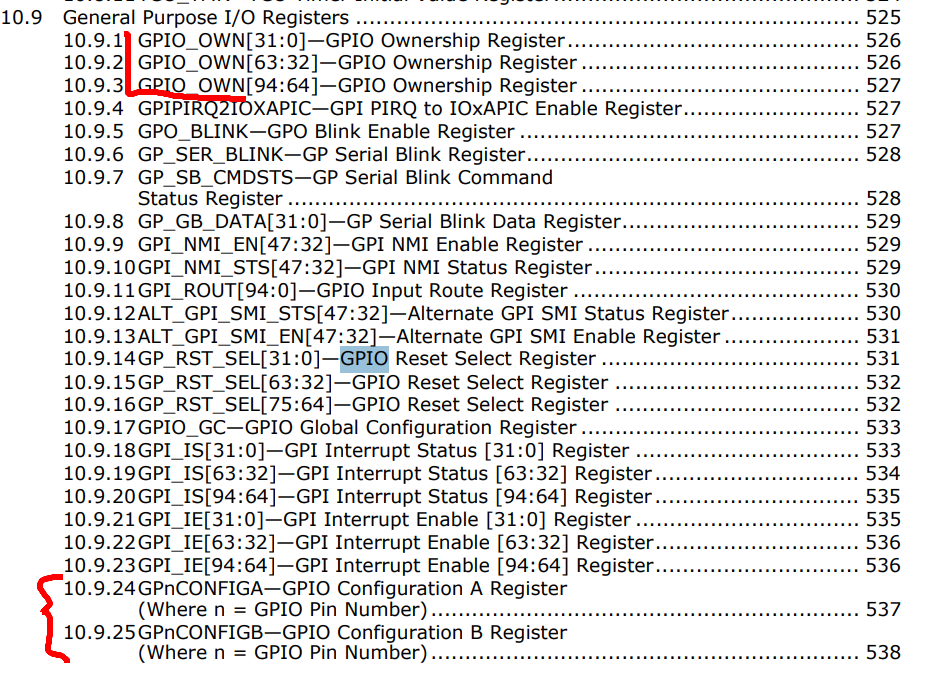
还有一个问题是Broadwell PCH-LP GPIO 寄存器模型有一些独特

  1. Broadwell PCH-LP GPIO

image-20260512151333257

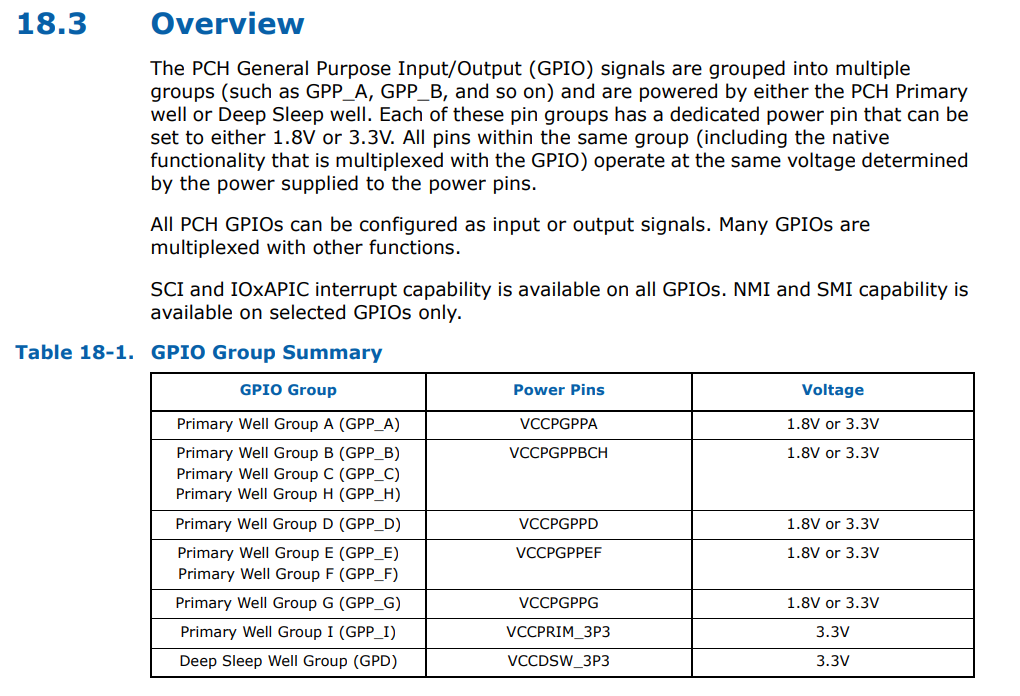
  1. skylake PCH GPIO
    image-20260512152923948

可以看到他们对于gpio的控制方法以及寄存器布局有着明显的区别

既然内核没有办法接管那么我们就自己控制
首先如何确定我们这个8针gpio的寄存器地址都是哪些的呢
我们可是使用Inteltool查看对应的gpio寄存器并通过bios暴漏的修改gpio高低电平的方法对比两次gpio寄存器的不同

1
inteltool -g
1
2
3
4
5
6
7
8
9
10
11
12
13
14
15
16
17
18
19
20
21
22
23
24
25
26
27
28
29
30
31
32
33
< gpiobase+0x0100: 0x00000001 (GP0CONFIGA)
---
> gpiobase+0x0100: 0x80000001 (GP0CONFIGA)
54c54
< gpiobase+0x0108: 0x00000001 (GP1CONFIGA)
---
> gpiobase+0x0108: 0x80000001 (GP1CONFIGA)
56c56
< gpiobase+0x0110: 0x00000001 (GP2CONFIGA)
---
> gpiobase+0x0110: 0x80000001 (GP2CONFIGA)
58c58
< gpiobase+0x0118: 0x00000001 (GP3CONFIGA)
---
> gpiobase+0x0118: 0x80000001 (GP3CONFIGA)
60c60
< gpiobase+0x0120: 0x40000001 (GP4CONFIGA)
---
> gpiobase+0x0120: 0xc0000001 (GP4CONFIGA)
62c62
< gpiobase+0x0128: 0x40000001 (GP5CONFIGA)
---
> gpiobase+0x0128: 0xc0000001 (GP5CONFIGA)
64c64
< gpiobase+0x0130: 0x40000001 (GP6CONFIGA)
---
> gpiobase+0x0130: 0xc0000001 (GP6CONFIGA)
66c66
< gpiobase+0x0138: 0x40000001 (GP7CONFIGA)
---
> gpiobase+0x0138: 0xc0000001 (GP7CONFIGA)
176c176

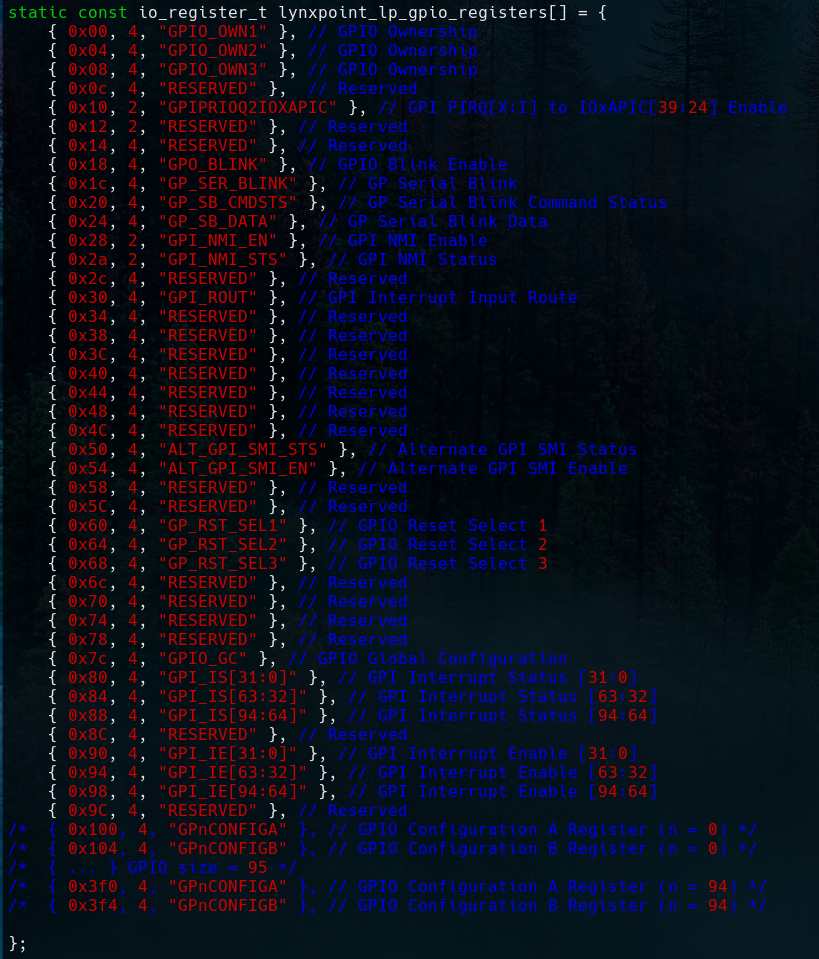
可以清楚的看到不同的地方这里就是我们要控制gpio对应的寄存器

在inteltool中的定义也可以看到
image-20260512155236733

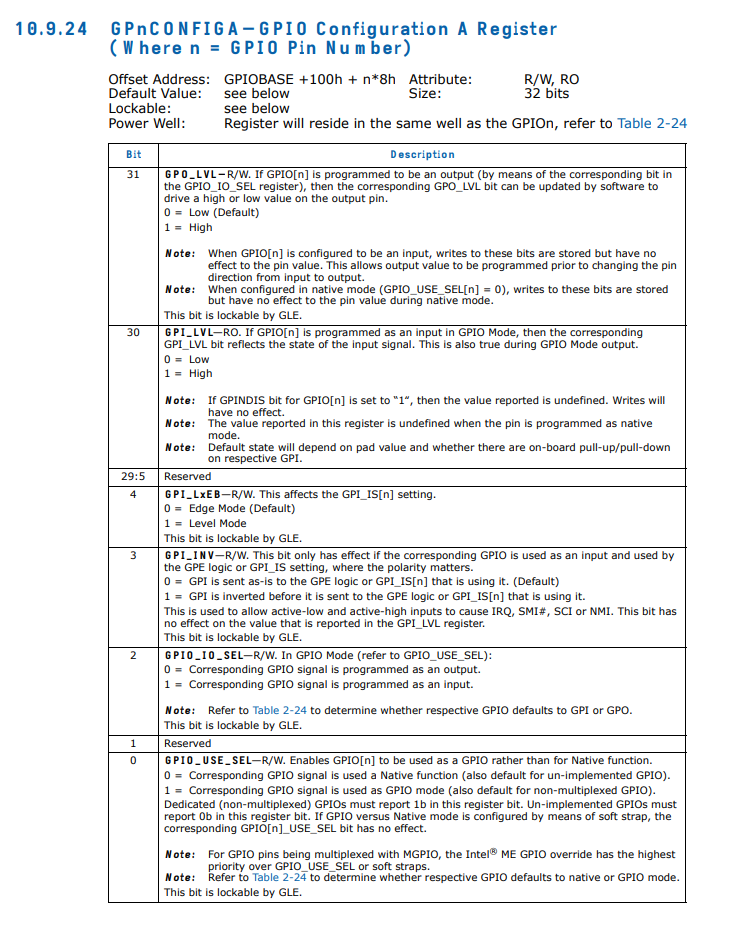
最后查看文档Broadwell PCH-LP Platform Controller Hub (PCH)我们就能够直接向修改寄存器控制我们的gpio了

根据文档描述
image-20260514230853571

构造对应gpio io寄存器内容然后使用out直接写进去就ok了

1
2
3
4
5
6
7
8
9
10
11
12
13
14
15
16
17
18
19
20
21
22
23
24
25
26
27
28
29
#include <stdio.h>
#include <stdlib.h>
#include <sys/io.h>
#include <stdint.h>
#define GPIOBASE 0x1c00
void set_gpio(int gpio, int high)
{
uint16_t addr = GPIOBASE + 0x100 + gpio * 8;
uint32_t val = inl(addr);
if (high)
val |= 0x80000000;
else
val &= ~0x80000000;
outl(val, addr);
printf("GPIO%d = %s (0x%08x)\n",
gpio,
high ? "HIGH" : "LOW",
val);
}
int main(int argc, char* argv[])
{
if (ioperm(GPIOBASE, 0x400, 1)) {
perror("ioperm");
return 1;
}
set_gpio(atoi(argv[1]), atoi(argv[2]));
return 0;
}

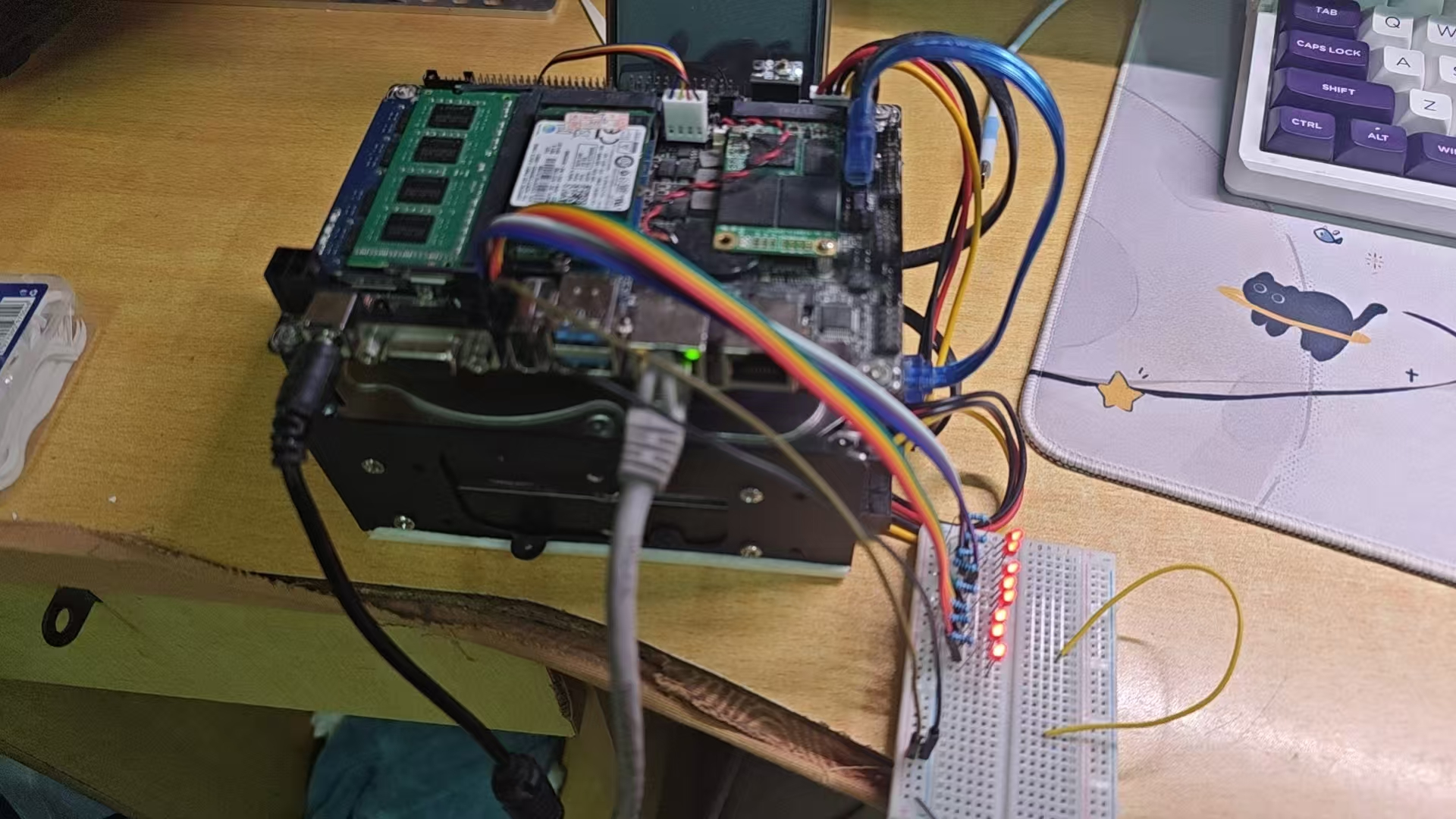
经过测试,文档没有骗我们八个gpio都能够成功点亮

image-20260514231522820

到这里就完工了吗no no no 不行
这种方法太不优美了直接操作io端口风险很大我们应该交给内核让它间接的帮我门操作比较好

1.Methord

既然gpio_ich不能操作我们该pch_gpio 那我们就构造内核模块实现类似gpio_ich的功能

1
2
3
4
5
6
7
8
9
10
11
12
13
14
15
16
17
18
19
20
21
22
23
24
25
26
27
28
29
30
31
32
33
34
35
36
37
38
39
40
41
42
43
44
45
46
47
48
49
50
51
52
53
54
55
56
57
58
59
60
61
62
63
64
65
66
67
68
69
70
71
72
73
74
75
76
77
78
79
80
81
82
83
84
85
86
87
88
89
90
91
92
93
94
95
96
97
98
99
100
101
102
103
104
105
106
107
108
109
110
111
112
113
114
115
116
117
118
119
120
121
122
123
124
125
126
127
128
129
130
131
132
133
134
135
136
137
138
139
140
141
142
143
144
145
146
147
148
149
150
151
152
153
154
155
156
157
158
159
160
161
162
163
164
165
166
167
168
169
170
171
172
173
174
175
176
177
178
179
180
181
182
183
184
185
186
187
188
189
190
191
192
193
194
195
196
197
198
199
200
201
202
203
204
205
206
207
208
209
210
211
212
213
214
215
216
217
218
219
220
221
222
223
224
// SPDX-License-Identifier: GPL-2.0
/*
* Simple GPIO driver for Intel Lynxpoint PCH (IO port based)
* GPIOBASE = 0x1c00, 95 pins
* Each pin has two 32-bit config registers at: 0x100 + pin*8 (CONFIG1)
* and 0x104 + pin*8 (CONFIG2).
*
* CONFIG1 bits:
* 31: OUT_LVL
* 30: IN_LVL
* 2: DIR (0=output, 1=input)
* 1-0: USE_SEL (must be 01 for GPIO mode)
*
* CONFIG2 bits:
* 2: GPINDIS (input disable, we keep 0)
* 1-0: pull up/down (not used here)
*/

#include <linux/module.h>
#include <linux/gpio/driver.h>
#include <linux/io.h>
#include <linux/ioport.h>
#include <linux/platform_device.h>

#define DRIVER_NAME "simple_lp_gpio"
#define GPIO_BASE 0x1c00
#define GPIO_NUM 95

#define CONFIG1_OFFSET(n) (0x100 + (n) * 8)
#define CONFIG2_OFFSET(n) (0x104 + (n) * 8)

#define OUT_LVL_BIT BIT(31)
#define IN_LVL_BIT BIT(30)
#define DIR_BIT BIT(2)
#define USE_SEL_MASK GENMASK(1, 0)
#define USE_SEL_GPIO 1

static void __iomem *gpio_base; /* ioport mapped virtual address */

static int simple_gpio_get(struct gpio_chip *chip, unsigned int offset)
{
u32 val = ioread32(gpio_base + CONFIG1_OFFSET(offset));
return !!(val & IN_LVL_BIT);
}

static int simple_gpio_set(struct gpio_chip *chip, unsigned int offset, int value)
{
void __iomem *reg = gpio_base + CONFIG1_OFFSET(offset);
u32 val = ioread32(reg);

if (value)
val |= OUT_LVL_BIT;
else
val &= ~OUT_LVL_BIT;

iowrite32(val, reg);
return 0;
}

static int simple_gpio_dir_input(struct gpio_chip *chip, unsigned int offset)
{
void __iomem *reg = gpio_base + CONFIG1_OFFSET(offset);
u32 val = ioread32(reg);

/* set direction to input (DIR_BIT = 1) */
val |= DIR_BIT;
/* ensure GPIO mode */
val = (val & ~USE_SEL_MASK) | USE_SEL_GPIO;

iowrite32(val, reg);
return 0;
}

static int simple_gpio_dir_output(struct gpio_chip *chip, unsigned int offset, int value)
{
void __iomem *reg = gpio_base + CONFIG1_OFFSET(offset);
u32 val = ioread32(reg);

/* first set output level */
if (value)
val |= OUT_LVL_BIT;
else
val &= ~OUT_LVL_BIT;

/* then set direction to output (DIR_BIT = 0) */
val &= ~DIR_BIT;
/* ensure GPIO mode */
val = (val & ~USE_SEL_MASK) | USE_SEL_GPIO;

iowrite32(val, reg);
return 0;
}

static int simple_gpio_get_direction(struct gpio_chip *chip, unsigned int offset)
{
u32 val = ioread32(gpio_base + CONFIG1_OFFSET(offset));
if (val & DIR_BIT)
return GPIO_LINE_DIRECTION_IN;
else
return GPIO_LINE_DIRECTION_OUT;
}

static struct gpio_chip simple_gpio_chip = {
.label = DRIVER_NAME,
.owner = THIS_MODULE,
.get = simple_gpio_get,
.set = simple_gpio_set,
.direction_input = simple_gpio_dir_input,
.direction_output = simple_gpio_dir_output,
.get_direction = simple_gpio_get_direction,
.base = -1, /* dynamic base */
.ngpio = GPIO_NUM,
.can_sleep = false,
};

static int simple_gpio_probe(struct platform_device *pdev)
{
struct resource *res;
int ret;

res = platform_get_resource(pdev, IORESOURCE_IO, 0);
if (!res) {
dev_err(&pdev->dev, "No IO resource found\n");
return -ENODEV;
}

/* request the IO port region */
if (!request_region(res->start, resource_size(res), DRIVER_NAME)) {
dev_err(&pdev->dev, "IO region 0x%lx busy\n", (unsigned long)res->start);
return -EBUSY;
}

/* ioport_map gives us a virtual address to use with ioread32/iowrite32 */
gpio_base = ioport_map(res->start, resource_size(res));
if (!gpio_base) {
dev_err(&pdev->dev, "ioport_map failed\n");
release_region(res->start, resource_size(res));
return -ENOMEM;
}

ret = gpiochip_add_data(&simple_gpio_chip, NULL);
if (ret) {
dev_err(&pdev->dev, "Failed to register gpio chip: %d\n", ret);
ioport_unmap(gpio_base);
release_region(res->start, resource_size(res));
return ret;
}

platform_set_drvdata(pdev, &simple_gpio_chip);
dev_info(&pdev->dev, "Registered %d GPIOs at IO 0x%lx\n", GPIO_NUM, (unsigned long)res->start);
return 0;
}

static void simple_gpio_remove(struct platform_device *pdev)
{
struct gpio_chip *chip = platform_get_drvdata(pdev);
struct resource *res = platform_get_resource(pdev, IORESOURCE_IO, 0);

gpiochip_remove(chip);
if (res) {
ioport_unmap(gpio_base);
release_region(res->start, resource_size(res));
}
}

static struct platform_driver simple_gpio_driver = {
.probe = simple_gpio_probe,
.remove = simple_gpio_remove,
.driver = {
.name = DRIVER_NAME,
},
};

static struct platform_device *simple_gpio_device;

static int __init simple_gpio_init(void)
{
int ret;

/* register platform driver */
ret = platform_driver_register(&simple_gpio_driver);
if (ret)
return ret;

/* create platform device with IO resource */
simple_gpio_device = platform_device_alloc(DRIVER_NAME, -1);
if (!simple_gpio_device) {
platform_driver_unregister(&simple_gpio_driver);
return -ENOMEM;
}

struct resource res = {
.start = GPIO_BASE,
.end = GPIO_BASE + 0x3ff, /* cover 0x1c00 - 0x1fff */
.flags = IORESOURCE_IO,
};
ret = platform_device_add_resources(simple_gpio_device, &res, 1);
if (ret)
goto err;

ret = platform_device_add(simple_gpio_device);
if (ret)
goto err;

return 0;

err:
platform_device_put(simple_gpio_device);
platform_driver_unregister(&simple_gpio_driver);
return ret;
}

static void __exit simple_gpio_exit(void)
{
platform_device_unregister(simple_gpio_device);
platform_driver_unregister(&simple_gpio_driver);
}

module_init(simple_gpio_init);
module_exit(simple_gpio_exit);

MODULE_LICENSE("GPL");
MODULE_AUTHOR("Your Name");
MODULE_DESCRIPTION("Simple GPIO driver for Intel Lynxpoint PCH (IO port based)");

我们自己动手构造驱动以及利用kernel gpio driver 创建设备
到此我们就能在 /dev下面看到我们注册的设备并且能够使用libgpiod简单控制我们的这个gpio设备

2.Methord

第二个路径是pinctrl跟acpi table是紧密相关的必须到acpi table 里面注册设备才能触发该模块
并且kernel/drivers/pinctrl/intel/下面真的有对应我们平台的gpio模块==pinctrl-lynxpoint.c== 然后kernel/drivers/gpio/里面却没有

1
2
3
4
5
6
7
8
9
10
11
12
13
14
15
16
static const struct acpi_device_id lynxpoint_gpio_acpi_match[] = {
{ "INT33C7", (kernel_ulong_t)&lptlp_soc_data },
{ "INT3437", (kernel_ulong_t)&lptlp_soc_data },
{ }
};
MODULE_DEVICE_TABLE(acpi, lynxpoint_gpio_acpi_match);

static struct platform_driver lp_gpio_driver = {
.probe = lp_gpio_probe,
.driver = {
.name = "lp_gpio",
.pm = pm_sleep_ptr(&lp_gpio_pm_ops),
.acpi_match_table = lynxpoint_gpio_acpi_match,
},
};

可以看到该模块的触发条件是通过驱动名称或者acpitable 中设备的_HID
那我我们又有另一条可行的路径就是构造ssdt设备通过内核模块acpi_configs运行时创建设备

ssdt-gpio.dsl

1
2
3
4
5
6
7
8
9
10
11
12
13
14
15
16
17
18
19
20
21
22
23
24
25
26
27
28
29
DefinitionBlock ("", "SSDT", 2, "INTEL", "GPIOLP", 0x00000000)
{
External (\_SB_.PCI0.LPCB, DeviceObj)
Scope (\_SB_.PCI0.LPCB)
{
Device (GPO0)
{
Name (_HID, "INT33C7")
Name (_UID, Zero)
Name (_DDN, "Intel GPIO Controller")
Name (_CRS, ResourceTemplate ()
{
// 覆盖 0x1C00 ~ 0x1CFF
IO (Decode16, 0x1C00, 0x1C00, 0x01, 0xFF)
// 覆盖 0x1D00 ~ 0x1DFF
IO (Decode16, 0x1D00, 0x1D00, 0x01, 0xFF)
// 覆盖 0x1E00 ~ 0x1EFF
IO (Decode16, 0x1E00, 0x1E00, 0x01, 0xFF)
// 覆盖 0x1F00 ~ 0x1FFF
IO (Decode16, 0x1F00, 0x1F00, 0x01, 0xFF)
})
Method (_STA, 0, NotSerialized)
{
Return (0x0F)
}
}
}
}

我们只需要装载acpi_configs模块并将ssdt-gpio.aml文件放在对应的文件夹下面就可以动态的执行
在archlinux上面还能够使用一种更加优雅的方式
将我们的ssdt-gpio.aml放到/etc/initcpio/acpi_override 该文件夹下面
配置一下
HOOKS=(base systemd autodetect microcode modconf kms keyboard keymap sd-vconsole block filesystems fsck acpi_override)
然后生成信息initramfs就能在系统启动的时候自动使用该ssdt创建设备并成功触发pinctrl-lynxpoint当然也能使用libgpiod成功点灯
就此该问题历时半年完美解决